Saturday, 4 July 2015

Best 8 Apps & Gallery Locker App For Android In 2015

Best Android Apps And Gallery Lockers. 


1. AppLock

AppLock is one of the most popular Android App available on Google Play Store for free. It provide you the facility to secure your phone Application and data with password. You can only access the Applications if you know the correct password. It also provide the facility of pattern lock to different App with different background colors . It have Approximately 1 million users and support 24 different languages.

https://play.google.com/store/apps/details?id=com.domobile.applock&hl=en
android AppLock app

2. SmartLock

SmartLock is another Android Locker which is available on Google Play Store for free. It can lock phone inbuilt App as well as installed Apps. Its media tab show all the media files like audio, video, photos etc allow you to lock them. It can also lock USB storage and phone auto screen rotate. It also provide support for Android Lollipop version.  Approximately 5,000,000 users install this App. It allow both pattern and key lock.

https://play.google.com/store/apps/details?id=ukzzang.android.app.protectorlite&hl=en
android smartlock app

3. Perfect App Protector


Perfect App Protector is another popular Android App to protect your data and App which is available on Google Play Store for free. We can not delete an App before unlocking it. It also provide a unique feature that make it distinct from another Apps that is Stealth mode. In this mode an App become complete invisible from launcher. It allow you to lock any App with Pattern, Pin or gesture. It can also display fake messages when locked App is launched. Approximately 5,000,000 users install this App.

https://play.google.com/store/apps/details?id=com.morrison.applocklite&hl=en
android Perfect App Protector app


4. Smart App Protector


Smart App Protector is another Popular Android Apps which allow you to lock Gallery and installed phone Apps. It provide simple and easy to use interface. It is available on Google Play Store for free. You can lock the Apps with pattern, Pin and gesture. This App monitor unlocking the of Apps and on failed capture the screen shot of intruder. Approximately 7,000,000 users install this App. It also allow lock App using multiple passwords. 
https://play.google.com/store/apps/details?id=com.sp.protector.free&hl=en
android Smart App Protector app


5. Vision App Locker


Vision App Locker is popular and smart Android Application that is available on Google Playstore for free. This App locker provide a smart feature that make it distinct from other locker. We can use our face us a password to unlock any App. You are also required to provide a password in case of face recognition failure. It support both pattern and pin lock . We can lock Gallery and other inbuilt phone Apps, installed Apps.  Approximately 1000,000 users install this App.

https://play.google.com/store/apps/details?id=visidon.AppLock&hl=en
android vision App Locker


6. Safe Gallery


Safe Gallery is another Popular Android App which allow you to protect your Gallery App and Gallery media files. It is available on Google Play Store for free. With help of this App we can manage this Gallery and it allow to protect our data with Pin, Pattern etc. It allow simple and attractive interface. It support 4 languages including English. You do not need to worry about your data with the help of this App.

https://play.google.com/store/apps/details?id=ukzzang.android.gallerylocklite&hl=en
android Safe Gallery app

7. Gallery Lock


Gallery Lock is another Android locker which is available on Google Play Store for free. It also Support stealth mode that is you can hide a launch icon. We can share picture with Gallery Lock to any other App. It also support cloud backup to Google drive, dropbox etc. It allow the three attempt to open the Gallery after three failure it capture the image of Attacker. Approximately 10,000,000 users download this App.

download android Gallery Lock app
android Gallery Lock app


8. Secure Gallery 


Secure Gallery is an awesome Gallery locking App which is available on Google Play Store for free. It can hide picture and videos in the Gallery. It provide attractive and user friendly interface. It also support the stealth mode. It provide easy Gallery management. We can change the background of Gallery. It also provide image viewer and slide show for images. It support both pattern and Pin lock. Approximately 5,000,000 users download this App.

https://play.google.com/store/apps/details?id=com.sp.smartgallery.free&hl=en
android Secure Gallery app
So these are few best apps and gallery lockers for android.

Thursday, 2 July 2015

Smart S400 Flash file 10000% test

Smart S400


Download

Messenger For Computer pc

Messenger For Desktop:

A straightforward & excellent application for Facebook Messenger. Detachment for Desktop is an informal customer that permits you to utilize Facebook's informing administration on your Windows PC. Talk without diversions on any OS. Coordinated with your OS: Launch on OS startup, local notices and custom subjects. Delegate for Desktop is an impeccable programming for any individual who needs to have tireless access to Facebook talk without having the need to keep Facebook stacked in their program.
  •           latest version  :   Messenger for desktop 1.4.3
  •           Demands  :   windows x p /windows vista/Windows 7 & 8
  •          Average of user  :   4 star

Texting and a lot more:
  • Know when people have seen your texts.
  • Make HD calls anywhere in the world.
  • Snap photographs and shoot videos.
  • Pick from thousands of stickers.
  • Record voice messages.
  • Chat along with your favorite groups.

Download From Here:


Messenger For Desktop Images


0 Response to "Messenger For Desktop"

AVG (64-bit) Free Edition 2015

AVG (64-bit) Free Edition 2015


AVG Antivirus 2015 is dependable antivirus and anti spyware
 protection for Windows offered to download for free. In add-on
 AVG Download
Download Here
 the new included Link-scanner® Active Surf-Shield checks webpages
 for threats at the solely
 time that matters - when you're about to click that website link.
AVG Antivirus 2015 has these types of following features:
Award-winning antivirus along with anti-spyware
Real-time safe internet browsing on and searching
Quality proven by 80 million of users
Easy to download, install and use
Protection against viruses and spyware
Appropriate for Windows 7, Windows Vista and Or windows 7
AVG Antivirus 2015 is only readily available for single computer use for 
residence and non commercial use.

0 Response to "AVG (64-bit) Free Edition 2015"

Open YouTube In Pakistan With Out any Proxy in Pakistan

How to Open YouTube In Pakistan With Out any Proxy or Software:


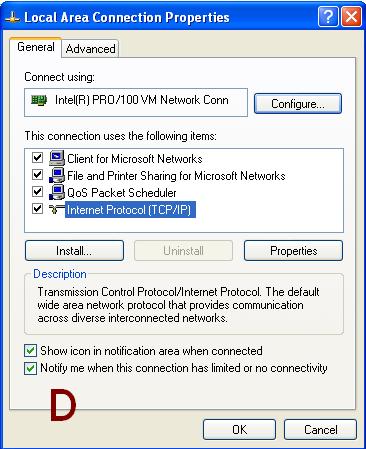
  1. click on start menu >>open control penal>>click on Network and Internet connection.
                                                                                                                                                                                                                               
  2. Click on Network Connection>>>>
                                                   

  3. Right Click on Local Area Connection>>>>>than click on Properties 


  4. click on internet protocol >>>>>>>than click on properties
                                                                              
  5. click on (use the following DNS server address)
    type 8.8.8.8 in the 1st box
    and type 8.8.4.4 in the 2nd box and SAVE.
                                                                         
  6. Enjoy You Tube in Pakistan.               

0 Response to "Open YouTube In Pakistan With Out any Proxy in Pakistan"

How To Hide Files & Apps On Android Phone

Method 1. Using GO Launcher Ex (For Non Rooted Phone)

Android GO Launcher Ex appGO launcher Ex is one of the popular Android launcher Application that allow you to hide your Apps and maintain your Privacy. It is available on Google PlayStore for free. It can also lock Apps with Pattern and pin lock. It support 4M apk to increase our phone performance. It also provide XX transition effect to each slide. It is a light weight application with attractive and easy to use interface. It also provide different types of wallpapers to make our screen more attractive. Approximately 1B install this App.

Steps To Hide Apps Using GO Launcher EX

Step 1. Open your Playstore Account from your Android Phone and Search GO Launcher.
Step 2. You need to scan for the QR code to install this App.
https://play.google.com/store/apps/details?id=com.gau.go.launcherex&hl=en
Step 3. Your Android Phone will Automatically search for GO Launcher App even if you do not have QR code scanner in your phone.
Step 4. Now install the GO launcher App in your phone.
Step 5. After the installation you have to apply GO Launcher to your Android device.
Step 6. Click and launch the App and by opening the main menu you can see different installed App in your App.
Android GO Launcher Ex hide app
Step 7. You can also go through the different option of the App by tapping the Menu button. From menu you look the Hide App option.
Step 8. A list of App will be shown on your screen.
Step 9. Now tick the Apps you want to hide and click the OK button.
Android GO Launcher Ex hide app option
Step 10. Now selected Apps will be hidden from your menu.

Method 2:- Using Link2SD Android App (for Rooted Phones)

Android Link2SD appLink2SD is an Android App which is available on Google Playstore for free. It is provide an easy way to hide the Apps in Rooted Android phones. This App hide the Apps by freezing the background running App. It provide dual benefits one by freezing the App and other by saving the Amount of RAM which is necessary for multitasking. It can auto clear cache service, notify when movable App is installed. It can freeze both system and installed App. It can convert system App to user App and vice versa. Approximately 12,000,000 install this App.

Steps To Hide Apps With Link2SD

Step 1. Download and Install the Link2SD Android App by clicking the button below.
https://play.google.com/store/apps/details?id=com.buak.Link2SD&hl=en
Step 2. Click and Launch the App into your phone.
Android Link2SD plus hide app
Step 3. You can go through different Apps option at least once to understand its different options.
Step 4. In the App you will see all installed Apps.
Step 5. Click on the menu button and look for frozen option.
Android Link2SD plus freeze app option
Step 6. You will see the Apps now select the Apps and press OK button.
Step 7. Now your Apps are completely hidden and to unhidden the App long press the desired App and select unfreeze option.

How To Extract .apk File From Android Phone

Best Ways To Extract .APK files On Android.


Method 1st:- Extract By Using APK Extractor

Android APK Extractor appApk Extractor is one the most popular Android Application which is Available on Google Play Store for free. This Application allow you to extract .apk file from installed App in any Android device. It also allow you take backup of any App and move it into SD card or another device like computer and Laptop and also allow you to upload into Google Drive. Approximately 5 Million install this App. After getting the .apk file you can share it with others. It is a easy to use and fast application which allow
  1. Extract all most all Applications include system Inbuilt application.
  2. NO device rooting of Android is needed.
  3. It provide search option to search different applications.
  4. It can extract multiple Apps files together.
  5. Compatible from Android version 2.2 to 5.0.

Steps To Extract .apk With APK Extractor 


1. Install Apk extractor into your Android device using the Button given below.
https://play.google.com/store/apps/details?id=com.ext.ui&hl=en
2. You can also download file manager to find the .apk file after extracting the file. By default the files are stored in /sdcard/ExtractedApks/.
3. Open the Apk extractor App on your device.
4. After launching the App you will see a list of installed Applications on your Android device.
Android APK Extractor app settings
5. Select the App whose .apk file you want to get.
6. You can also share the apk file tap and select the share option.
7. Tap the menu button-> then setting to change the path where you want to save .apk file.


Method 2nd:- Extract By Using ES File Explorer

Android ES File Explorer appEs file explorer is one the famous file manager available on Google play store for free. It not only manage the files but also perform various tasks like download manager, task killer, cloud storage client, file sharing etc. It is available in 30 different languages. It is compatible with all Android versions. It also provide built in support for text, images, audio, video, Rar and Zip files. It can act as file manager, App manager, task manager, Bluetooth file browsing and sharing, text and photo editor. One of its most important feature is extracting .apk file from installed Apps and provide backup and sharing facility also. Approximately 300 Million users install this App. It provide easy to use tools and attractive interface.

Steps To Extract .apk File Using ES File Explorer

1. Install and download the Es file Explorer into your device by clicking the following button.
 https://play.google.com/store/apps/details?id=com.estrongs.android.pop&hl=en
2. Open the and launch the App in your Android Device.
3. After Launching the App navigate to the tool menu.
4. In the tool menu select the application manager.
Android ES File Explorer app manager
5. In the application manager you will see a list of Apps installed in your device.
6. Select the App whose .apk file you want to get.
7. click on Backup and your .apk file will start extracting.
8. Browse the path where you want to save the file.